 ECEn 423
Table of Contents
Lab 11 - Final Processor
For this laboratory you will modify your pipelined processor from the previous lab to implement several new instructions and prepare your processor for download. You will also modify your Fibonacci code from a previous lab to execute on your processor.
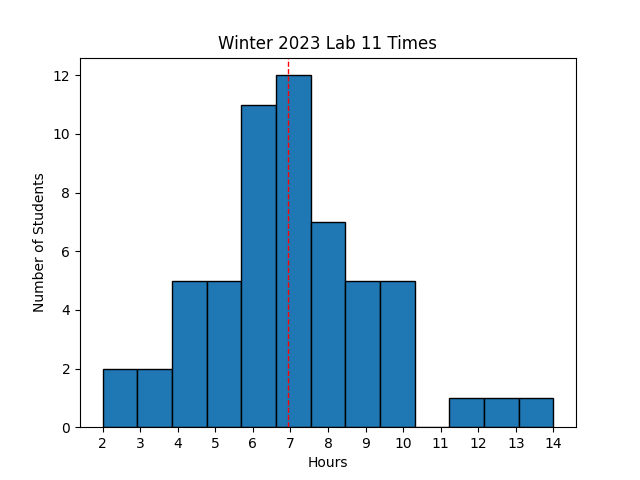 Avg Hours: 7.3, 7.3 (Winters 2022, 2021)
Learning Outcomes
- Understand how to implement jump instructions
- Modify the pipelined processor to implement several other instructions
Preliminary
In this laboratory exercise you will be adding a number of new instructions to your pipeline processor. Several preliminary exercises will be given to help you prepare for these processor changes. The instructions you will add include:
- Load upper-immediate Instruction: LUI
- Branch Instructions: BNE, BLT, BGE
- Jump Instructions: JAL, JALR,
The changes required to implement these instructions will be discussed below.
Load Upper Immediate Instruction, LUI
One of the limitations of the current processor is that we can only load immediate values that are 12-bits long (i.e., addi). This makes it difficult to create 32-bit constants and pointers to locations in memory that are far away from the current PC. To facilitate the creation of larger immediate values, you will need to implement the “load upper immediate” or LUI instruction. Review the operation of the LUI instruction by referring to the green card in your book or with the online RISC-V instruction set specification.
Determine the value written to the register x2 using the following LUI instruction (encoded): 0x03f2c137
There are several changes you will need to make to your processor to support this instruction. First, you will need to augment your “immediate generation” logic to generate a 32-bit immediate value using the “U-type” immediate format. In the ID stage you will need to decode the LUI instruction and when this instruction is found, generate the proper U-type immediate value.
The second change that should be made is to modify your control logic to support the unique functionality of the LUI instruction. The control logic should be modified so that the LUI instruction operates much like the ADDI (add immediate instruction). There is one key difference between the ADDI and the LUI: for the LUI, you should make sure that the register you read from the first read port (rs1) is always set to zero. The idea is that you want the new immediate value to be added to the value 0 (which is located in register 0). The result of the add will be the immediate value and this value can be written to the proper register in the register file as occurs with immediate instructions. Also, don’t forget that the RegWrite signal needs to be asserted for this instruction since it writes to the register file.
Branch Instructions
Your processor currently only supports one branch instruction: BEQ. You are required to add support for the following additional instructions: BNE (branch not equal), BLT (branch less than), and BGE (branch greater than or equal). Adding support for these instructions will require several changes to your processor. First, you will need to generate a “LESS_THAN” signal in the EX stage. This “LESS_THAN” signal indicates that the first operand of the ALU is “less than” the second operand of the ALU. This is easily obtained by evaluating the result of the subtract that occurs in the ALU during branch instructions. If the result is negative, then “LESS_THAN” should be true. Otherwise, “LESS_THAN” should be false. Like the “ZERO” signal, this signal needs to be pipelined from the EX stage to the MEM stage.
The second change is that you will need to keep track of which branch operation you are performing (‘funct3’ bits in the B=type instruction format) and send them through the pipeline to the MEM stage. In the MEM stage, you will need to use these ‘funct3’ bits as well as the ZERO and LESS_THAN flags to determine whether or not the branch is taken.
Complete the table below and determine whether the given branch is taken or not.
| Branch | ZERO | LESS_THAN | Taken? |
|---|---|---|---|
| BEQ | 0 | 0 | N |
| BEQ | 0 | 1 | |
| BEQ | 1 | 0 | |
| BNE | 0 | 0 | |
| BNE | 0 | 1 | |
| BNE | 1 | 0 | |
| BLT | 0 | 0 | |
| BLT | 0 | 1 | |
| BLT | 1 | 0 | |
| BGE | 0 | 0 | |
| BGE | 0 | 1 | |
| BGE | 1 | 0 |
Jump Instructions
For this final processor, you will need to add the two “jump” instructions: ‘jal’ and ‘jalr’. These jump instructions are essential for complex control flow and required when using subroutines in your program code. We will use these instructions in our final processor that we download on the FPGA in the next lab.
Determine which statements apply to each jump instruction in the lab report
Complete the table below by decoding each instruction and determining the Jump Target. Assume that the current value of the PC is 0xc00 and that register x4 contains the value 0x00041c00.
| Binary Instruction | Assembly Instruction | Jump Target |
|---|---|---|
| 0x0100016f | jal x2 16 | 0xc10 |
| 0x7f020167 | ||
| 0xff5ff16f |
Jumps are control flow instructions and operate very similar to branches in that they change the value of the PC. Unlike branch instructions, jumps are unconditional meaning that they always change the PC. Because jumps are unconditional and do not require the result of the ALU operation, it is possible to load the PC with the new value earlier in the pipeline (such as in the EX stage). To keep our processor simplier, however, we will design our jumps to update the PC in the MEM stage for consistency with branches.
The following changes will need to be made to your processor to implement these two jump instructions:
- Compute the proper jump target,
- Write PC+4 to a register, and
- Implement proper control flow pipeline flushing
Each of these functions will be described below.
Computing Jump Target
Just like the branch instructions, the jump instructions must compute a new address for the PC. This address is called the “PC Target”. The PC target for the two jump instructions are different from each other and the PC Target generated by branch instructions. Your processor will need to compute the following three different “PC Target” values: branches, JAL, and JALR. Each of these will be reviewed below.
Branch PC Target
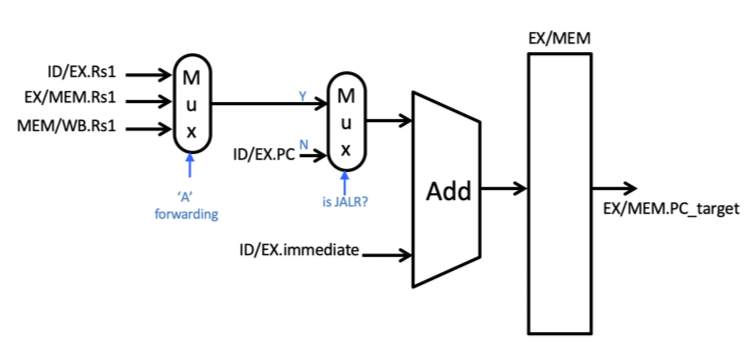
You already have logic in place to compute the branch PC target from your previous processor. This was done by adding the PC value of the branch instruction with the immediate value within the EX stage. The result was pipelined to the MEM stage.
JAL PC Target
The PC target for the JAL instruction is computed in a manner similar to the target for the branch instructions. For this instruction, the PC target is computed by adding an immediate value found within the instruction to the PC of the current jump instruction. The immediate value used by the JAL instruction, however, is different than the immediate value used by the branch instructions. The JAL instruction uses the J-immediate format and you will need to create new logic for implementing this new immediate form.
JALR
The PC target for the JALR instruction is computed differently than branches and JAL. The PC target is computed by adding the contents of a register (rs1) with an immediate value. The JALR instruction uses the same immediate value as the arithmetic/immediate instructions. Unlike the other two approaches, the PC is not used in the computation of the PC target for the JALR instruction.
The following figure demonstrates how the dedicated adder used for computing the branch target in the EX stage can be modified to compute the PC target in the EX stage for all three situations. The key modification is the addition of a MUX that chooses between adding the PC (for the branch and JAL instructions) and the value of rs1 (for the JALR instruction). Note that since rs1 is used for the JALR instruction, forwarding logic is needed to forward values in the pipeline to this input.
Write PC+4 to a Register
The next capability that must be added to support the jump instructions is the ability to write the value of PC+4 into the register file. Like all instructions that write to the register file, the JAL and JALR instructions must write a value to the register file in the WB stage. As such, the RegWrite signal must be set high for both of these instructions when they are in the WB stage.
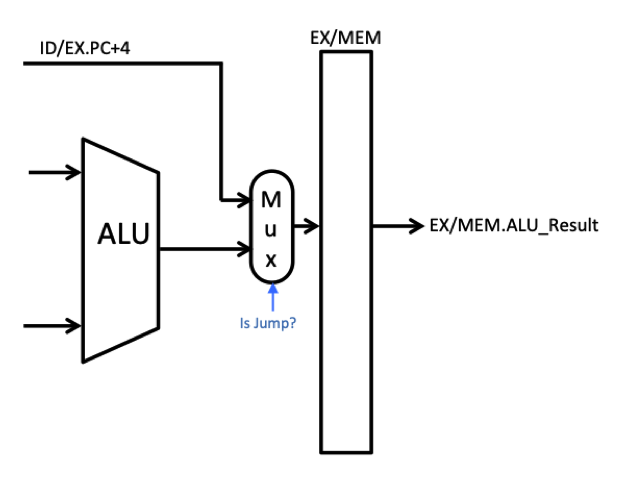
These two instructions must also compute the PC+4 value and make it available to the register file during the WB stage (i.e, written to the regWriteData port of the register file). There are a number of different ways of computing this value and passing it to the WB state. One relatively easy way to do this is to compute PC+4 in the EX stage and pass this value as the alu_result in the MEM stage. Once stored as the alu_result in the MEM stage, it will move down to the WB stage so that it can be written to the register file. The following modifications to your pipeline should be made (as shown in the figure below):
- Add an “+4” adder in the EX stage that computes ex_PC_plus_4 (i.e, ex_PC_plus_4 = ex_PC + 4)
- Add a multiplexer that selects between the output of the ALU and this ex_PC_plus_4 signal. For Jump instructions the multiplexer should select the ex_PC_plus_4. For all other instructions, the multiplexer should select the output of the ALU.
- The output of the multiplexer goes to the ALU_result pipeline register in the MEM stage (i.e., mem_alu_result)
Implement Pipeline Flushing
The last functionality needed to support jump instructions is to implement the control hazards. Because the jump instructions change the PC, it will cause control hazards. To simplify the changes needed to support jump instructions, we will address control hazards with jump instructions in the same way we do for branch instructions. Specifically, we will allow the jump instruction to proceed through the pipeline and then when it reaches the MEM stage, we will flush the three instructions behind the jump. Unlike branches, however, jumps are always taken and we will need to flush the pipeline each time a jump occurs. There are other more efficient ways to implement jumps, but we will stick with this approach to simplify the design. An example of the pipeline behavior for jumps is shown below. Note that you should make sure your jumps also handle the special ‘load-use-jump’ condition that was described for branches in the pipeline forwarding lab.
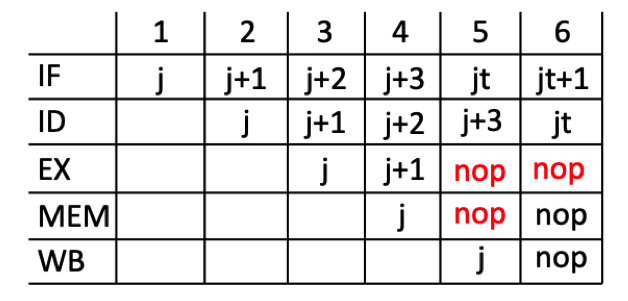
In the figure above, the ‘j’ represents either of the two jump instructions (‘jar’ or ‘jalr’). The ‘j+1’ instruction represents the instruction in the program memory immediately following the jump. The ‘jt’ instruction represents the jump target instruction.
- Place a NOP instruction in the EX and MEM stages in the clock cycle after the jump instruction is in the MEM stage.
- Place a NOP instruction in the EX stage in the clock cycle after the jump instruction is in the WB stage.
Exercises
Before proceeding with your laboratory exercises, update your repository with the latest lab starter code.
Exercise #1 - Support for Additional Instructions
The primary task of this lab is to modify your pipelined RISC-V processor from the forwarding lab to include support for additional instructions described in the preliminary. You should start this lab by copying your forwarding processor into a new file named “riscv_final.sv” and rename your top-level module to “riscv_final”. The parameter and ports for the final processor are the same as the previous lab.
| Module Name: riscv_final | |||
|---|---|---|---|
| Parameter | Width | Default Value | |
| INITIAL_PC | 32 | 0x00400000 |
| Port Name | Direction | Width | Function |
|---|---|---|---|
| clk | Input | 1 | Global clock |
| rst | Input | 1 | Asynchronous Reset |
| PC | Output | 32 | Program Counter in IF stage |
| iMemRead | Output | 1 | Enable instruction memory reading |
| instruction | Input | 32 | Current instruction in the ID stage |
| ALUResult | Output | 32 | Value of the ALUResult in the EX stage |
| dAddress | Output | 32 | Address for the data memory |
| dReadData | Input | 32 | Value of the data read from he MEM stage |
| dWriteData | Output | 32 | Value of the write data in the MEM stage |
| MemRead | Output | 1 | Data Memory Read signal |
| MemWrite | Output | 1 | Data Memory Write signal |
| WriteBackData | Output | 32 | Value of write data in the WB stage |
Exercise #2 - Testbench Simulation
In this exercise you will simulate your final processor with a program named final.s.
Create a makefile rule that generates the final_text.mem and final_data.mem files from the final.s assembly language.
Generate your memory files using the ‘Text at zero’ memory model.
You may also want to generate a debug final_text.txt file to help you understand the instructions in the program (this is not required).
A testbench named tb_riscv_final.sv has been provided to you to simulate your processor.
Create a makefile rule named sim_riscv_final that will run the simulation of your processor with the provided testbench and using the final_text.mem and final_data.mem files as the instruction and data memory contents, respectively (see labs 8 & 9 on how to do this).
This rule should generate a file named sim_riscv_final.log.
The testbench is designed to run until the “ebreak” instruction is executed. If your processor successfully reaches the “ebreak” instruction then you have passed the testbench.
Indicate the time at which the simulator stopped.
Exercise #3 - Fibonacci Sequence Code Simulation and Testbench
For this exercise, you will write two RISC-V assembly language subroutines to compute the Fibonacci sequence using the subset of instructions supported by your processor. One subroutine will compute the Fibonacci sequence using an iterative approach and the other will compute the Fibonacci sequence using a recursive approach. You will simulate this programs on the RARS simulator before simulating it Vivado operating on your RISC-V processor.
A RISC-V assembly language program named fib_main.s has been provided to you that will call each of your two subroutines.
This program sets up the stack and will call each of your Fibonacci sequence subroutines 15 times (each with an input of 0 to 14).
The program will store the results of your Fibonacci sequence computations in the data memory so that you can verify the results after simulating your program in RARS and in Vivado.
Review this program to familiarize yourself with how the stack is used to pass arguments and how results are stored in memory.
You are to create a RISC-V assembly language file named fibonacci.s that includes the two Fibonacci subroutines called by the fib_main.s code (iterative_fibonacci and recursive_fibonacci).
The two Fibonacci subroutines you will create for this lab will be similar to those you completed in Lab #4 but with some important differences.
Your new Fibonacci programs may only use the instructions that your RISC-V processor supports - you should not use any instruction that your processor cannot execute.
Be careful when you use pseudo-instructions as these instructions may be replaced with instructions that may not be supported by your processor.
Address each of the following issues when creating your Fibonacci subroutines:
- Add the appropriate header to the file
- Start the file with a
.textdirective to indicate your code is in the text segment - Make each of the two subroutines ‘global’ using the
.globaldirective so that they can be called from thefib_main.scode (i.e.,.globl iterative_fibonacci) - Create the appropriate labels for each of the two subroutines before the code (i.e.,
iterative_fibonacci:andrecursive_fibonacci:) - The input argument for each subroutine will be passed in register a0 (i.e., the nth Fibonacci number to compute is passed in a0).
- The result of the Fibonacci computation should be returned in register a0 (i.e., the nth Fibonacci number is returned in a0).
- End your subroutine with the
retpseudo-instruction to return to the caller - Add three
nopinstructions after theretinstruction to ensure that there are instructions in the pipeline for the last instruction
RARS Simulation
After coding your two Fibonacci subroutines, simulate your code using the RARS simulator to make sure it operates properly before simulating it in Vivado (it is easier to debug in RARs than in Vivado). When simulating with the RARs GUI, keep in mind the following:
- Load both files into the editor and make sure the “Assemble all files currently open” option is checked
- Use the “Text at zero” memory configuration (Settings->Memory Configuration, select “Text at zero”)
- .text: 0x00000000
- .data: 0x00002000
- stack pointer: 0x00003ffc
When your program is running correctly in the RARS GUI, you should see the Fibonacci numbers from 0 to 14 stored in the data memory starting at address 0x2000 (i.e., the first Fibonacci number is stored at address 0x2000, the second Fibonacci number is stored at address 0x2004, etc.).
Once your program is running correctly, add the makefile rule below to your makefile to run your program from the command line.
fib_main.log: fibonacci.s
  java -jar ../resources/rars1_6.jar fib_main.s fibonacci.s mc CompactTextAtZero 0x2000-0x207c s0 ic nc | tee fib_main.log
This makefile rule will run the
fib_main.sprogram in the RARS simulator on the command line with yourfibonacci.scode and generate a log file namedfib_main.log. Themc CompactTextAtZerooption sets the memory configuration to “Compact, Text at Address 0”. Thes0 icoption tells the simulator to print the value of register s0 (which is used to store the result of the Fibonacci computations) and the instruction count after the program terminates. The0x2000-0x207coption tells the simulator to print the contents of the data memory from address 0x2000 to 0x207c after the program terminates (this is where the results of the Fibonacci computations are stored). The passoff script will check to make sure that the correct Fibonacci numbers are stored in the data memory.
What is the value of the ‘a0’ register when the program terminates with the ‘ebreak’ instruction?
How many instructions were executed to finish executing your program?
Testbench Simulation
Once your code operates properly within the RARS simulator, you are ready to simulate your program on your processor within Vivado.
Before simulating your program, you need to generate the fib_main_text.mem and fib_main_data.mem memory files used by the simulator.
The following makefile rule will generate these files from your fib_main.s and fibonacci.s assembly language files using the “Text at zero” memory model.
fib_main_text.mem: fib_main.s fibonacci.s
	java -jar ../resources/rars1_6.jar fib_main.s fibonacci.s mc CompactTextAtZero \
    a dump .text HexText fib_main_text.mem \
		a dump .data HexText fib_main_data.mem
    a dump .text SegmentWindow fib_main_text.txt
To simulate, you need to elaborate your design with the appropriate parameters to use the fib_main_text.mem and fib_main_data.mem.
The following two makefile rules will elaborate and simulate your design with the appropriate parameters to run the Fibonacci program on your processor.
Note that the simulation rule generates a log file named sim_riscv_final_fib.log that will be checked by the passoff script to verify that your program runs correctly on your processor.
elab_riscv_final_fib: analyze fib_main_text.mem fib_main_data.mem
	xelab --nolog tb_riscv_final -debug typical -timescale 1ns/100ps -s tb_riscv_final_fib \
		-generic "TEXT_MEM=fib_main_text.mem" -generic "DATA_MEM=fib_main_data.mem" \
    -generic "PRINT_MEMORY=1"

sim_riscv_final_fib: elab_riscv_final_fib
	xsim tb_riscv_final_fib -log sim_riscv_final_fib.log -runall
After setting up your simulation with your new Fibonacci sequence, simulate your program until it terminates without an error. This program will take much longer to run than previous programs.
Indicate the time at which the simulator stopped in your Fibonacci code. Enter your number in nanoseconds. Every student’s stop time will be different, so any answer will receive full credit (your response will be used for statistical analysis.)
Exercise #4 - Synthesis
The final exercise in this lab is to synthesize your pipelined processor in ‘out_of_context’ mode.
Create a makefile rule named riscv_final.dcp that runs this synthesis script.
This rule should generate a synthesis log file named riscv_final.log as well as the design checkpoint file riscv_final.dcp.
You will not be generating a bitfile for this lab, so you do not need to perform the implementation step
Carefully review your synthesis warnings to identify any potential problems with your processor that will prevent you from downloading it to the FPGA in the next lab.
Pass Off
The final step in the laboratory process is to complete the ‘pass off’. Carefully review the instructions for Git Submission as you prepare your submission for this lab. You will need to run the following command successfully to submit your lab:
python3 passoff.py --submit
Include the following information at the end of your laboratory report.
How many hours did you work on the lab?
Provide any suggestions for improving this lab in the future
How did you use AI to help you with this lab