 ECEn 423
Table of Contents
Lab 4 - RISC-V Simulator
In this laboratory, you will learn more about assembly language programming and learn how to use the RARS RISC-V simulator. This RISC-V instruction set simulator will allow you to simulate the execution of individual instructions operating on the RISC-V processor. Instruction set simulators are helpful for a number of purposes including understanding the details of an instruction set, improving low-level processor performance, and understanding execution time.
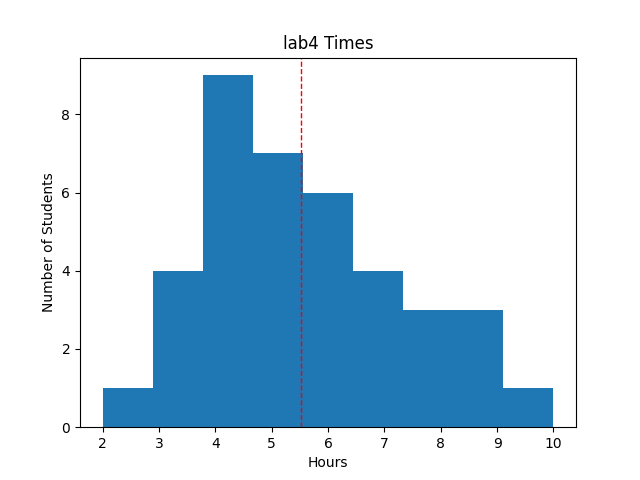 Avg Hours: 6.2, 5.4, 5.4, 5.5 (Winter 2026, 2023, 2022, 2021)
Learning Outcomes
- Learn how to write RISC-V assembly language programs
- Learn how to use the RARS RISC-V simulator
- Create programs in assembly language and simulate them
Preliminary
In this laboratory you will be reviewing and writing a number of RISC-V assembly language programs. It will be important for you to understand assembly language programs and write functioning assembly language programs for this lab. Although the textbook provides some simple examples of RISC-V assembly language instructions and code segments, it does not provide an adequate description for writing full assembly language programs. Read and review the following Assembly Language Tutorial to learn more about assembly language programming for the RISC-V. After reading this tutorial, answer the following questions. Answers to these questions will be found in the tutorial and Chapter 2 of the textbook.
Match each of the following programming language abstractions: binary machine language, assembly language, and high-level source files like C.
Match the function of each of the following: compiler, assembler, and linker
Match the purpose of each of the following: stack, text segment, data segment, and heap.
Determine the order of the following memory segments in memory (see Figure 2.13): Heap, Stack, Static data, and text segment
Match each register with its purpose
What is a ‘pseudo instruction’?
Identify the ‘pseudo instruction’s in the instruction list
Identify the actual instruction sequence associated with the following pseudo Instruction: li ti, 0
We will use the RARS Java RISC-V simulator to assemble and simulate our assembly language programs. Review the RARS Tutorial tutorial to familiarize yourself with the simulator.
After reviewing the tutorial, use the RARs simulator to answer the following questions. For memory location responses, provide your response as 8-digit hex values using lower case letters (i.e., ffffffff)
What is the default memory address of the start of the text segment for the simulator? (GUI: Settings: Memory Configurations)
What is the memory address of the start of the static data in the data segment for the simulator (GUI: Settings: Memory Configurations)
What is the memory address of the start of the dynamic data (heap) in the data segment for the simulator? (GUI:Settings: Memory Configurations)
What is the memory location of the stack segment for the simulator? (GUI: Settings: Memory Configurations)
Exercises
Before proceeding with your laboratory exercises, update your repository with the latest lab starter code.
Exercise #1 - RISC-V Assembly Language Examples
In addition to understanding the RARS GUI, it’s recommended to feel comfortable with the material from Chapter 2 of the textbook as well as having access to the online The RISC-V Instruction Set Manual to complete this lab. We will be using the 32-bit (RV32I) instructions. RISC-V instructions for the RV32I used by this simulator can be found in pages 13-29 (pdf pages 31-47) and 35-37. Pages 129-136 (pdf pages 147-154) provide a reference for RISC-V assembly language instructions.
All the assembly language files that you will be provided in the starter code will use ‘tabs’ instead of spaces for indentation and formatting. These files were also created using ‘8 spaces per tab’ that is default for the RARS editor.
Example #1
The first assembly example computes the factorial of an input value and writes the result to the output memory location.
This file is located in the repository starter code at lab04/example_1.s.
The program provides a basic example of branches, loads, saves, and arithmetic.
Step through the program to understand how it works.
The program will not stop but will loop at the end.
Match the purpose of each of the following assembly langauge directives: .globl, .data, .word, .text
How many unique extended (pseudo) instructions are there in this example? (note that using ‘lw’ with a label is a pseudo instruction)
What does the last instruction do?
What is the cycle count when the simulator gets to the first j exit_loop? (step through the program). Note that the cycle count can be found in the simulator under the ‘control and status’ tab (see ‘cycle’)
What is the actual instruction sequence represented by the pseudo instruction lw a0,input?
Example #2
The second example builds upon the first factorial example by adding system calls and placing the factorial function in a basic subroutine.
This file is located in the repository starter code at lab04/example_2.s.
The system calls provide basic printout features and a program exit.
What is the printout when the program is executed?
What is the cycle count when the program finishes?
Which system calls are used in this example?
In what register does the jal fact_func instruction store the return address?
What is the 32-bit value located at address 0x10010008 of the data segment?
This example can also be run from the command line:
java -jar ../resources/rars1_6.jar example_2.s
Example #3
The third example adds a complete calling convention to the factorial subroutine using the stack to help you see how the stack works.
This file is located in the repository starter code at lab04/example_3.s.
This program will take more cycles to execute, but it performs the same function.
The stack allows you to call sub routines within your main function without messing up the data in the calling function.
You will need to write a function in a later exercise that uses the stack.
What is the cycle count when the program finishes?
What is the smallest value that the stack pointer (sp) reaches during the execution of the program?
Which registers are saved on the stack at the start of the ‘fast_func’ procedure?
Exercise #2 - Factorial Example
In this exercise you will experiment with a function that uses recursion. The C code shown below is a recursive function to compute the factorial of a value.
int fact_rec(int n) {
    if (n>=1)
        return n*fact_rec(n-1);
    else
        return 1;
}
This example will be implemented in two files.
The first, fact_rec_main.s, is the ‘main’ function that will call the ‘fact_rec’ recursive subroutine.
This example demonstrates how you can use obtain input from the user to specify the value you want to use for the factorial function.
The second file, fact_rec.s, implements the actual recursive factorial function.
Carefully review both files to understand how the stack frame is used to implement recursion.
To run a ‘multi-file’ assembly example in the RARS simulator, specify both files in the command line and use the ‘g’ option to open the GUI as follows:
java -jar ../resources/rars1_6.jar fact_rec_main.s fact_rec.s g
To run these two files in the GUI perform these additional steps:
- Set the following option: Settings->”Assemble All Files Currently Open”
- Select the
fact_rec_main.sfile - Hit the “assemble” button
- Run the code using the ‘run’ button
You can also run this on the command line without the ‘g’ option.
Run the recursive example with an input value of 10. Answer the following questions regarding this assembly language program with an input value of 10 :
Determine the address of the ‘fact_func’ procedure within the .text segment
What is the address where the ascii string “! = “ is stored?
What is the value of the stack pointer before the program executes?
How many instructions were executed to compute the factorial of 10?
Create a new assembly file fact_rec_78.s that implements the ‘main’ function and does the following:
- Calls the
fact_recprocedure to compute the factorial of 7 - Calls the
fact_recprocedure to compute the factorial of 8 - Adds the two results
- Prints the results with the string “!7 + !8 =
" (where is replaced with the result of the operation)
Add the fact_rec_78.s in your repository.
Create a makefile rule named fact_rec_78 that runs your assembly language program from the command line and writes the output to a file named fact_rec_78.out.
You can send the output both to the stdout and a file using the ‘tee’ command:
java -jar ../resources/rars1_6.jar fact_rec_78.s fact_rec.s | tee fact_rec_78.out
Exercise #3 - Fibonacci Number
For this exercise, you will create two different RISC-V assembly language subroutines that generate the n’th Fibonacci Number. This subroutine takes as a parameter an integer value, n, and returns the Fibonacci value of n. Fibonacci numbers are defined with recursion as follows:
- F(0) = 0
- F(1) = 1
- F(n) = F(n-1) + F(n-2) (for n>=2)
For example, if the input is n=3, your subroutine should return “2” (F(3) = 2).
The first version of the Fibonacci Number will be done using an iterative method (in a file named fib_iterative.s) and the second version will be done using recursion (in a file named fib_recursive.s).
In each file you will define a procedure named fibonacci that will be called from another ‘main’ program.
Two ‘main’ assembly language functions have been provided for you.
fib_main_input.s: Accepts user input for the input to thefibonacciprocedure.fib_main_10.s: Computes thefibonacciprocedure with an input of 10.fib_main_multiple.s: Callsfibonaccimultiple times with different inputs.
You will need to follow the Assembly language coding standards when you write your code.
Iterative
Begin by creating a fibonacci procedure using an iterative approach in a file named fib_iterative.s.
Define a label named fibonacci and place it in the .text segment.
Further, make the fibonacci procedure visible globally by listing it with the .globl assembler directive (review the file fact_rec.s to see how to do this).
Implement the first version of this function using an “iterative” approach. Sample C code for computing Fibonacci numbers iteratively is shown below:
int fib_iterative(int a) {
  if (a==0) return 0;
  if (a==1) return 1;
  int fib_2 = 0;
  int fib_1 = 1;
  int fib = 0;
  for (int i=2;i<=a;i++) {
    fib = fib_1 + fib_2;
    fib_2 = fib_1;
    fib_1 = fib;
  }
  return fib;
}
Note that this code is given only as an example to help you get started. You don’t have to implement your iterative Fibonacci exactly as shown. You can modify the approach however you like so long that it provides the correct result and does not use recursion.
Creating Loops in Assembly
There are no built in “loops” in assembly language and you will need to implement the loop in your assembly code for the ‘iterative’ version. The loop syntax contains the following four distinct segments of code:
- Loop variable initialization: This code is executed just once before executing the loop. This is where the loop variables are initialized.
- Check loop condition: This code is executed at the start of the loop body. If the loop condition is not true, the loop body is skipped and the code exits the loop.
- Post Loop Update: This is the code that is executed after the execution of a single loop body and is used to update the loop variables.
- Loop Body: This is the main body of the loop that is executed if the loop conditions are true.
The code example below demonstrates each of these four segments are located:
for (<initialize loop variables>,<check loop condition>,<post loop update>)
  <body of loop>
The following example below demonstrates how these four segments of code can be implemented in assembly language
loop_init:           # Label for the start of the loop code
# 1. Initialize the loop variables (executes once for loop)
   addi t0, x0, x0   # t0 is the loop variable (initialized to 0)
   addi t1, x0, 5    # t1 is the loop limit constant

loop_body_start:     # Label for start of loop
# 2. Check loop condition (branch out of loop if false)
   bge t0, t1, loop_end  # branch out of loop if the index is >= 5

# 3. Loop body. Put the instructions for the body of the loop here

# 4. Post Loop Update.
   addi t0, t0, 1    # Increment loop index t0
   beq x0, x0, loop_body_start # Unconditional branch back to the start of the loop

# A label after the loop (for exiting the loop)
loop_end:       # Label for code after loop
After debugging your iterative fibonacci you can run the function by using one of the main functions as suggested below:
java -jar ../resources/rars1_6.jar fib_main_multiple.s fib_iterative.s
Create a makefile rule named fib_iterative that runs your function using the fib_main_multiple.s main file as shown above.
You will need to include the fib_iterative.s in your Git repository.
Generate a file named fib_iterative.out as part of your makefile rule using the ‘tee’ command demonstrated earlier.
Answer the following questions about your iterative version.
How many iterations of the loop will be executed for fib_iterative(5)?
How many clock cycles did it take for your code to process fib_iterative(10)?
Recursive
Implement the second version of this function using a “recursive” approach and name your file fib_recursive.s.
Declare a label named fibonacci and make it globally visible as you did for the iterative approach.
C code for computing Fibonacci numbers recursively is shown below:
int fib_recursive(int a) {
  if (a==0) return 0;
  if (a==1) return 1;
  return fib_recursive(a-1) + fib_recursive(a-2);
}
The recursive version looks simpler than the iterative code but the recursive version will make multiple, repetitive calls for the same Fibonacci number.
Determine the number of times the function fib_recursive is called when calling the function with an input of 5 (i.e, fib_recursive(5)). Include the first call to the function in our count. You may want to write out the recursive call history to determine this number.
How many clock cycles did it take for your code to process fib_iterative(10)?
Create a makefile rule named fib_recursive that runs your function using the fib_main_multiple.s main file as shown above.
You will need to include the files fib_recursive.s and fib_iterative.s in your Git repository.
Generate a file named fib_recursive.out as part of your makefile rule using the ‘tee’ command demonstrated earlier.
Pass Off
The final step in the laboratory process is to complete the ‘pass off’. Carefully review the instructions for Git Submission as you prepare your submission for this lab. You will need to run the following command successfully to submit your lab:
python3 passoff.py --submit
Include the following information at the end of your laboratory report.
How many hours did you work on the lab?
Provide any suggestions for improving this lab in the future
How did you use AI to help you with this lab