 ECEn 320
Table of Contents
Several steps are required to successfully submit and passoff each laboratory assignment. This tutorial describes each of these steps in detail.
1. Update Starter Code
Your classroom repository should have a secondary remote to the class “startercode” repository as described in the GitHub repostiory setup instructions. This “startercode” repository contains the code necessary for you to complete each laboratory assignment. It is essential that you update the starter code in your local repository before starting each laboratory assignment to make sure you have the latest code available (this code will be updated throughout the semester to fix bugs and add new features). You are responsible for updating your local repository with the latest starter code before submitting your laboratory assignment.
The git commands necessary for updating your starter code are as follows:
git fetch startercode
git merge startercode/main -m "Merging starter code"
2. Commit and Push to GitHub
Each laboratory assignment requires you to create new files. You must commit all these files to your GitHub repository in the corresponding laboratory directory. Further, you must push these files to your remote classroom repository so they can be graded by the TAs. The passoff section of each laboratory description will list all the required files You will not receive any credit for the passoff section of the lab if you are missing any of the required files.
3. Implement and Test Makefile Rules
Each laboratory assignment requires you to run certain Makefile rules. You must:
-
Create a Makefile in your laboratory directory that implements
make clean. This should delete any temporary files. For labs with subdirectories (starting in the second lab), you can runmake cleanin the subdirectory, for example:clean: cd binary_adder; make clean - In certain labs (including the first lab), the laboratory directory Makefile must also implement other rules as specified in the passoff section of the lab.
- Make sure that the built-in make rules in the various module subdirectories work properly, as described in the passoff section of the lab (this doesn’t apply to the first lab)
The full list of required rules will be listed in the passoff section of each laboratory description. You will not receive any credit for the passoff section of the lab if you are missing any of the required Makefile rules or if any of these rules fail.
Note: Do not put any source command in your Makefile that sources the settings64.sh file.
When the passoff scripts are run they will already have set up the environment to run your script.
If you perform the source command in your Makefile it will result in a failed passoff when checked by the TAs.
4. File Management
You must have a .gitignore that ignores all intermediate files generated while running the required Makefile rules.
A provided .gitignore file in the root of your repository will ignore any temporary files placed in a work/ directory, which should cover most of the temporary files generated using the provided common.mk Makefile (this is introduced in the second lab).
5. Lab Passoff Script
Each laboratory assignment contains a ‘passoff’ python script that will check to make sure you have completed all the required tasks for the lab. You should run this script to verify that you have completed all the required tasks for the lab and that there are no errors. The script may provide warnings and errors. Unresolved warnings will result in penalties to your passoff grade. You will not receive any credit for the passoff section of the lab if you have any errors when running the passoff script.
You can run this script directly from the lab directory as follows:
make passoff_check
The script will perform a number of tests and will provide feedback on the status of these tests. Continue to rerun the script until all warnings and errors have been resolved.
Once you have resolved all warnings and errors, submit your assignment by running the script:
make passoff_submit
This will perform the official submission of your lab to the GitHub repository. It will do the following:
- Tag your repository with the proper lab-specific tag
- Check to make sure that the ‘.commitdate’ file in your tagged repository is created. (this will be used to determine if you submitted on time)
You may run the make passoff_submit script as many times as you like (there is no penalty for multiple submissions).
However, every time you run make passoff_submit, the submission date of your lab will be updated.
If your submission date is past the deadline for the lab, you will receive a late penalty as described in the laboratory policies.
If the submission fails . . .
If your make passoff_submit continues to print messages saying that the commit file has not been created then you may not have GitHub Actions setup properly on your GitHub repository.
Follow these instructions to fix this problem (this is a one-type problem that occurs when you first setup your repository).
-
Visit the website of your repository
The URL of your repository is:
https://github.com/byu-ecen320-classroom/320-labs-<githubid>where<githubid>is your unique GitHub ID. -
Click on the “Actions” button in the tool-bar of the web page.
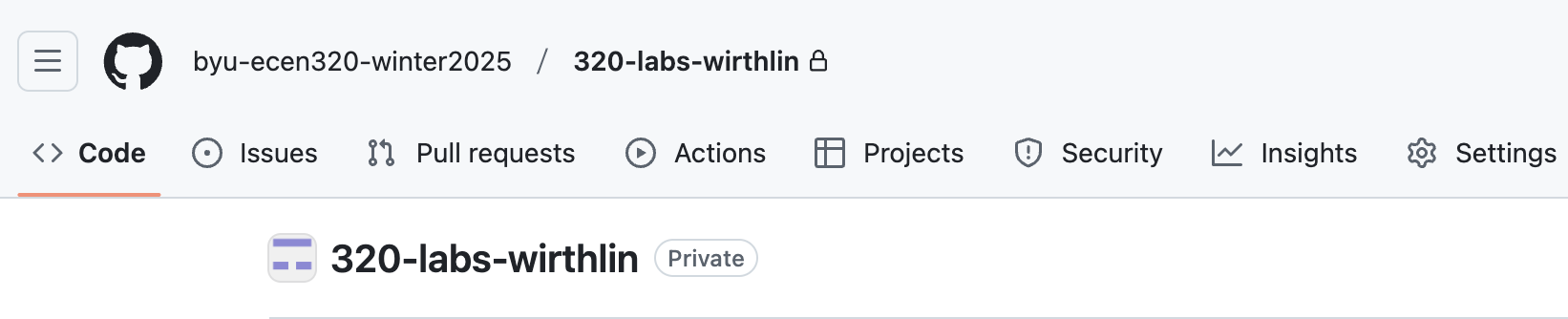
You may see the following image:
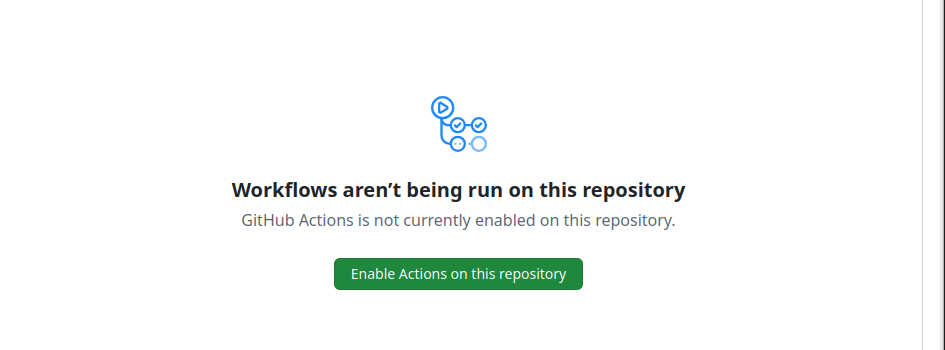
Click “Enable Actions on this repository”
-
Make a small change in your repository. (i.e., change the aboutme.txt or such). Recommit the file and push it to the repository.
-
Rerun the passoff script.