 ECEn 320
Table of Contents
In this lab you will create a four-digit seven segment display controller. You will use this controller in a design that displays a 32-bit number.
The average time to complete this lab is 3.8 hours.
Learning Outcomes
- Learn how to design a sequential circuit to control a multi-digit seven segment display
- Learn how to use module parameters to specialize a module
- Learn how to read and understand timing reports
Preliminary
In an earlier lab you learned how to create a seven segment display decoder to display a single digit on the 4-digit seven segment display on the Basys3 board. For this lab, you will learn how to drive multiple digits on the display with different values. In order to do this, you will need to create a sequential counter that will control the display of each individual digit. The preliminary section of this lab will guide you through the approach for creating a multi-digit display controller.
Time Multiplexing of Digits
As described in the Seven Segment Lab, all four digits share the same cathode connections to the FPGA. With this configuration, all digits will display the same value if their corresponding anode signals are asserted. You saw this in Seven Segment Lab when the left button was pressed and all anode signals were asserted. In this case, all four digits displayed the same value as specified by the switches.
Driving the same value on all four digits isn’t that useful. Instead, we want the ability to drive each digit with a unique value so we can display a four-digit number (i.e., 16 bit hexadecimal value). To display a different value on each of the digits, you must design a controller circuit that only turns on one digit at a time and drives that digit with the appropriate segment signals. For example, to display the value “71” on the first two digits, you would assert anode signal for the first digit and drive the cathodes to display “1”. During this first period, only the first digit is being displayed. After a short period of time, the first digit is turned off and the second digit is turned on and the cathodes are driven to display “7”. This process repeats continuously in a technique called time multiplexing.
It may seem that such a technique will result in flickering on the display since only one digit is being displayed at any one time. However, if the rate at which each digit is turned on is fast enough, the eye cannot perceive this flickering, and the display appears to be continuously illuminated. Each digit is illuminated just one-fourth of the time, but because the eye cannot perceive the darkening of a digit before it is illuminated again, the digit appears continuously illuminated. If the update rate, or refresh rate, is slowed to around 45 hertz, a flicker can be noticed in the display. For each of the four digits to appear bright and continuously illuminated, all four digits should be driven once every 1 to 16ms, for a refresh frequency of about 1KHz to 60Hz. For example, in a 62.5Hz refresh scheme, the entire display would be refreshed once every 16ms, and each digit would be illuminated for 1/4 of the refresh cycle, or 4ms. The diagram below demonstrates this refresh process.
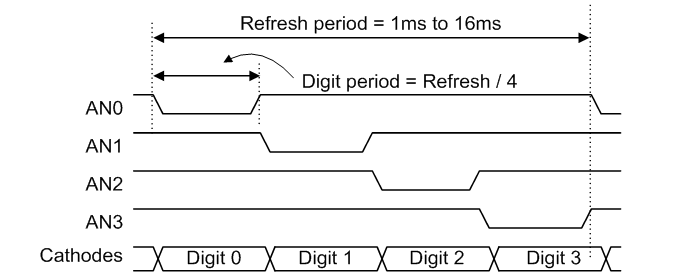
As seen in this figure, only one anode signal is asserted at a time. While one of the anode signals is asserted, the cathode signals that correspond to the digit to be displayed are also asserted. After some fixed time period, a different anode signal is asserted and the cathode signals are changed to reflect the value that should be displayed on the corresponding digit. Answer the questions below to demonstrate your understanding of the multi-segment display controller. For these questions, use the Basys3 clock frequency of 100 MHz.
Assume that your seven segment display uses a refresh rate of 1 kHz. How many clock cycles are needed for one full refresh cycle of all four digits?
How many clock cycles are needed to display a single digit using this 1 KHz example?
How many clock cycles are needed to display a single digit if the refresh rate is reduced to 250 Hz?
What will happen if the refresh is too slow?
Parameters
The seven segment display controller you are designing should be flexible to operate at a variety of refresh rates and input clock frequencies. To make your module more flexible and reusable, you will need to create parameters that can be changed when instancing your module in a design. Your module will need to include the following two parameters:
CLK_FREQUENCY: This parameter will specify the clock frequency in Hertz of the clock input to the module. The default value is 100 MHz (100_000_000) which is the input clock rate of the Basys3 board. Providing this parameter will allow this module to be used on other boards that use a different clock rate.REFRESH_RATE: This parameter will specify the rate at which the 4 digit display is refreshed. The default value is 200 Hz. This parameter will allow you to change the refresh rate to suit the application needs.
Your module will use these parameters to determine how many clock cycles to display each digit. You will need to create an internal parameter to calculate the number of clock cycles to display each digit. The following example demonstrates how to create an internal parameter that performs this calculation based on the parameter values:
// Determine the number of clock cycles to display each digit
localparam DIGIT_DISPLAY_CLOCKS = CLK_FREQUENCY / REFRESH_RATE / 4;
How many clock cycles are needed to display each digit using the default parameter values?
You will need to create a counter that counts to this maximum value to control the display of each digit.
To create this counter, you will need to know the number of bits needed to represent the maximum count value.
You can use the SystemVerilog $clog2 function to make this determination.
This function computes the “ceiling” of the log base 2 of the maximum count value.
The following code segment demonstrates how to determine the number of bits to represent this maximum count and how to use this count to declare a counter signal:
// Determine the number of bits needed to represent the maximum count value
localparam DIGIT_COUNTER_WIDTH = $clog2(DIGIT_DISPLAY_CLOCKS);
// Declare a signal used for this counter signal
logic [DIGIT_COUNTER_WIDTH-1:0] digit_display_counter;
How many bits are needed to represent this maximum count value using the default parameter values?
Exercises
Make sure to merge in any changes from the startercode before starting the lab.
Exercise #1: Multi-Digit Seven Segment Display Controller
In this first exercise, you will create a multi-segment display controller that will drive the four-digit seven segment display on the Basys3 board.
Begin by creating a file named seven_segment4/seven_segment4.sv with the following parameters and ports:
| Module Name: seven_segment4 | ||
|---|---|---|
| Parameter | Default | Function |
| CLK_FREQUENCY | 100_000_000 | Specifies the frequency of the input clock |
| REFRESH_RATE | 200 | Specifies the display refresh rate in Hz |
| Port Name | Direction | Width | Function |
|---|---|---|---|
| clk | Input | 1 | Clock input |
| rst | Input | 1 | Reset input |
| data_in | Input | 16 | Indicates the 16-bit value to display on the 4 digits |
| blank | Input | 4 | Indicates which digits to blank |
| dp_in | Input | 4 | Indicates which digit points to display |
| segment | Output | 8 | Cathode signals for seven-segment display (including digit point). segment[0] corresponds to CA and segment[6] corresponds to CG, and segment[7] corresponds to DP. |
| anode | Output | 4 | Anode signals for each of the four digits. |
Once you have created your module definition, follow the steps outlined below to complete the module. The structure of your seven segment decoder is shown below and will be referenced in the instructions.
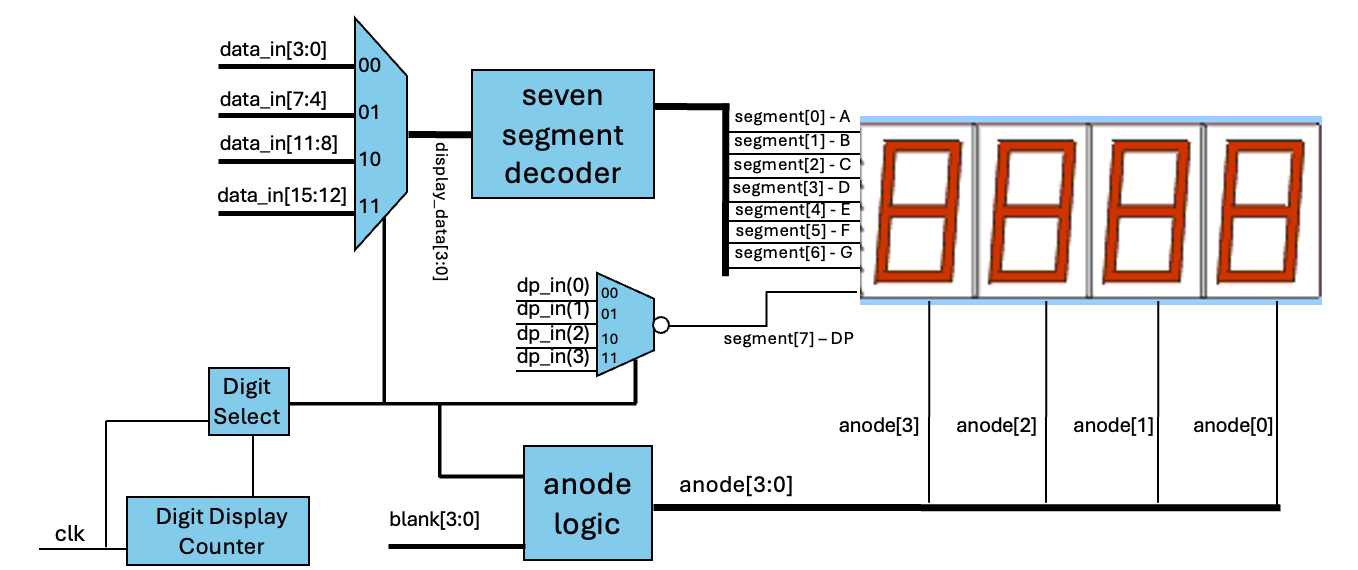
Step 1. Create the digit display counter
- Begin your module by creating the local parameters and declaring the digit display counter signal as described in the preliminary section.
- Next, create a free running counter using an
always_ffblock that counts the proper number of clock cycles for displaying a digit (this is the Digit Display Counter in the figure above). This counter should have a reset as described in class. - Next, create a two-bit counter that indicates which of the four digits to display (i.e., the Digit Select counter in the figure above). This counter should increment every time the digit display counter reaches its maximum value. Like the digit display counter, this counter should be reset using a reset.
Step 2. Data In Multiplexer
Create a multiplexer that selects the appropriate 4-bit value to display based on the digit select counter.
For example, if the digit select counter is 2'b00, then the first 4-bits of the data_in signal should be selected.
The output of this multiplexer will be used as the input to the seven segment decoder (labeled display_data in the figure).
You can use a combinational always_comb block with a case statement to create this multiplexer.
Step 3. Instance your seven segment decoder
Instance your seven_segment module created in the Seven Segment Lab to create a seven segment decoder.
Connect the .data input and the .segment output to the appropriate signals.
This module will only control the lower 7 bits of the segment output (i.e., segment[6:0]), since the 8th bit (i.e., segment[7]) is used for the digit point.
Step 4. Create the digit point multiplexer
The dp_in[3:0] signal indicates which of the four digits should have its decimal point illuminated.
Each bit corresponds to a digit point on each of the four digits.
You will need to create a multiplexer that will select the appropriate value for the DP segment based on the digit select counter.
Note that the dp_in signal is high asserted, while the digit point segment signal is low asserted.
Step 5. Create the anode logic
Create combinational logic (always_comb) for the anode signals.
The logic is based on the digit select counter.
Remember that the anode signals are active low, so you drive an anode signal low to turn on the corresponding digit.
This logic must also incorporate the blank input signal, which indicates which of the four digits should be blanked (i.e., turned off).
Note: This is the first lab in which you are using behavioral SystemVerilog (i.e., always_ff and always_comb blocks).
There are a number of coding standards that are specific to these blocks.
Refer to the coding standard requirements to make sure you comply with these standards.
You may want to simulate your design at this point, or you can move on to the next exercise where you will simulate your design using a provided testbench.
At minimum, you may want to create an empty sim.tcl file and run make sim to make sure there are no syntax errors in your design.
When simulating your controller, you will not want to simulate with the default low refresh rate. At such a low rate, it will take a very long simulation time. For simulation purposes, you will want to set the refresh rate to a much higher value. You can do this by setting a variable in your Makefile like so:
SIM_PARAMS = REFRESH_RATE=500000
Include the file seven_segment4/seven_segment4.sv in your repository.
Exercise #2: Seven Segment Controller Testbench Simulation
A testbench (seven_segment4/tb.sv) has been provided to verify the functionality of your seven segment display controller.
By default, the testbench will simulate with a refresh rate of 500,000 Hz.
How many clock cycles are needed to display each digit using the 500,000 Hz refresh rate?
Make sure that your testbench simulates without any errors and that the timing of each segment is correct.
What is the time in nano seconds in which the simulation ends?
Exercise #3: Top-level Design
With a working seven-segment display controller, you will now create a top-level design that will use this controller to display 16-bit values.
Create a file named ssd_top/ssd_top.sv and name your module ssd_top.
Provide the following parameters and ports for your module:
| Module Name: ssd_top | ||
|---|---|---|
| Parameter | Default | Function |
| CLK_FREQUENCY | 100_000_000 | Specifies the frequency of the input clock |
| REFRESH_RATE | 200 | Specifies the display refresh rate in Hz |
| Port Name | Direction | Width | Function |
|---|---|---|---|
| clk | Input | 1 | Clock input |
| sw | Input | 16 | Indicates the 16-bit value to display on the 4 digits |
| btnc | Input | 1 | Invert (i.e., NOT) the value to display |
| btnd | Input | 1 | Reset signal |
| btnu | Input | 1 | Shut off display of digits |
| btnl | Input | 1 | Turn on all digit points |
| btnr | Input | 1 | Turn off left two digits |
| segment | Output | 8 | Cathode signals for seven-segment display (including digit point). segment[0] corresponds to CA and segment[6] corresponds to CG, and segment[7] corresponds to DP. |
| anode | Output | 4 | Anode signals for each of the four digits. |
Once you have created your module definition, follow the steps outlined below to complete the module.
- Instance your 4-digit seven segment display controller in your top-level module.
- Pass the top-level parameters
CLK_FREQUENCYandREFRESH_RATEto the seven segment controller - Attach the
anodeandsegmentsignals to the top-levelanodeandsegmentports - Attach the top-level clock to the clock input
- Attach the top-level reset to the
btndsignal
- Pass the top-level parameters
- The input to
data_inshould be the value of the switches ifbtncis NOT pressed, or an inverted version of the switches ifbtncis pressed. - Create a signal for the
blankinput of the controller. Ifbtnuis pressed, blank all four digits. Ifbtnris pressed, blank the left two digits. Otherwise, do not blank any digits. - Create a signal for the digit points of the controller. When
btnlis pressed, turn on all digit points. Otherwise, turn off all digit points.
Once you have created the top-level design, perform a few simple simulations to verify the functionality of your design.
Include the file ssd_top/ssd_top.sv in your repository.
Exercise #4: Synthesis, Implementation, Timing Analysis, and Download
-
Create an XDC file (
ssd_top/basys3.xdc) for your top-level design to map the top-level ports to pins on the Basys3 board.Include the file
ssd_top/basys3.xdcin your repository. -
Run synthesis and carefully review the synthesis log to make sure there are no warnings.
How many FDCE/FDRE cells are used by the design? (sum the total of the two)
How many total LUT resources are used by the design? (add up all the LUT* resources)
How many total IBUF and OBUF resources do you have in the design?
-
Run implementation. After successfully implementing your design, download the bitstream to the Basys3 board and verify that the display is functioning as expected.
-
Review the ‘utilization.rpt’ file to answer the following questions.
How many ‘Slice LUTs’ are used by your design?
How many ‘Slice Registers’ are used by your design?
- Since you are using a clock in this design and there are logic paths that go from a flip-flop to another flip-flop, Vivado will perform timing analysis to determine whether the specified clock period can be met.
The implement.tcl script you ran includes the following command to generate a timing report:
report_timing_summary -max_paths 2 -report_unconstrained -file timing.rpt -warn_on_violationReview the
timing.rptfile to answer the following questions.What is the Worst Negative Slack or ‘WNS’ of your design?
How many TNS total Endpoints are there in your design?
What is the name of the ‘Source path’ of the max delay path?
- Open the implemented design (review Vivado Device Viewer Section of the Common Makefile Tutorial if needed).
Find the flip-flop (FDCE or FDRE) associated with bit 0 of your
digit_display_counterwithin the implemented design layout. Take a screenshot of this resource (and those other resources in the same slice) and include it in your repository. Name this screenshotssd_top/fpga.png.
Final Pass-Off
Refer to the passoff tutorial for the passoff process.
- See
required_filesin the passoff script. - Makefile rules that must work correctly and be free from errors and warnings:
Makefile:cleanseven_segment4/Makefile:sim_tbssd_top/Makefile:synth,implement
Answer the final two questions in your laboratory report:
How many hours did you work on the lab?
Provide any suggestions for improving this lab in the future